
A JEE test paper can be set from a phone in about four minutes, from the staff room, from home or from the bus. Open your institute's workspace, tick the chapters, say how many questions and how hard, and the paper is built from a ready bank of JEE-level questions with keys and solutions already attached. One more tap shares it to the batch, and students sit it on their own phones on the NTA-style screen. Nobody types a question, nobody types a key, and nobody waits for the computer at the desk to be free.
What you get
- A ready JEE Main bank, chapter and topic wise, every question with its key and solution. Tick chapters, or tick a previous-year paper to make last year's exam this week's mock.
- The pattern set for you. Generate the paper automatically, Random for a drill or JEE Aligned to keep JEE Main's ratio of MCQs to numerical questions spread across chapters, or pick the questions yourself. Difficulty is ticked per level, and a share of previous-year questions is blended in by percentage or count.
- A full mock in one go. Switch on the auto JEE-pattern paper and the chapters are chosen for you across the syllabus, three sections, official marking.
- Your own questions beside the bank. Every paper your institute has converted or typed sits in your own bank, and a paper can draw from both with the split you set.
- JEE Advanced as well. A separate builder starts from the official pattern, with sections for single-correct, multiple-correct with partial marks, numerical and matching questions, filled from the Advanced bank or converted from a past paper PDF. Set the sections on a laptop, share from anywhere.
- Students on phones, results on yours. The paper runs on the NTA-style screen scaled to a phone, and the rank list and per-question analysis appear on your phone as they submit.
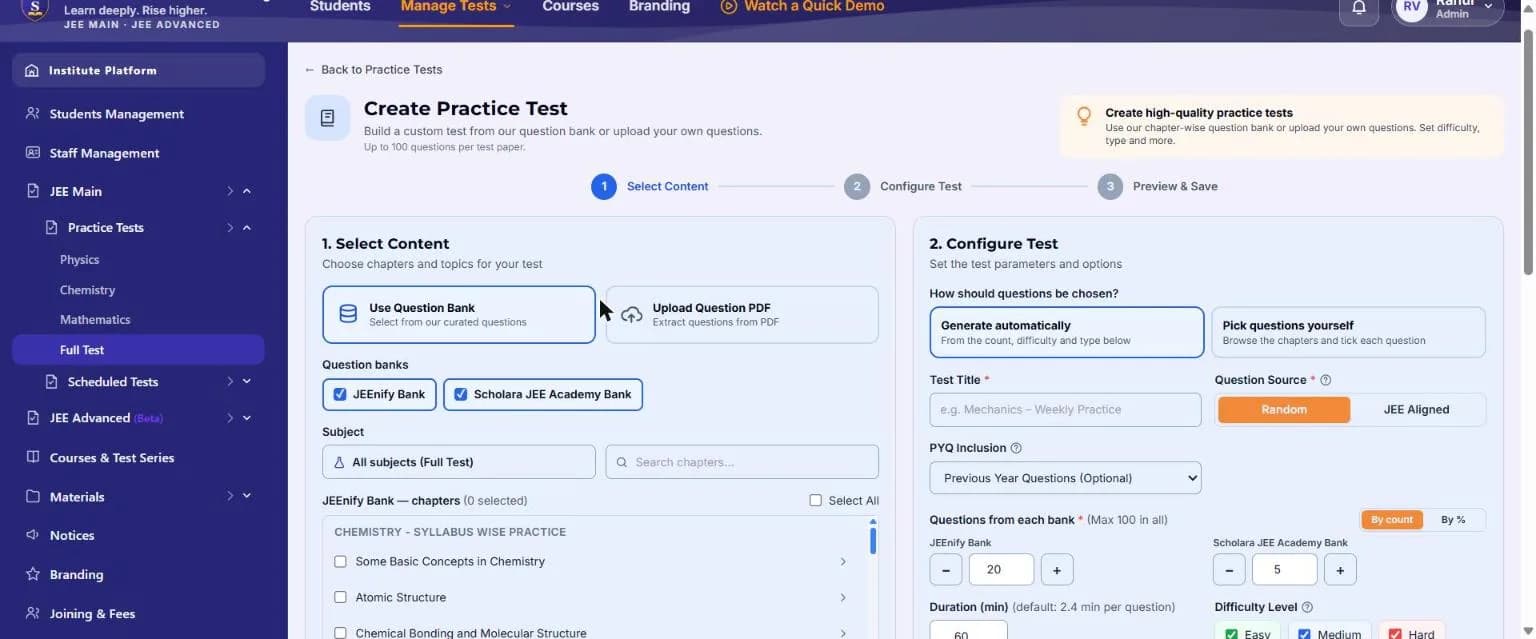
How easy it is
The workspace is a web page, so the phone's browser is enough, and Install app puts it on the home screen with an icon. The create page is one scrolling screen with the same steps a laptop shows, stacked. A 20-question chapter test on a chapter you taught this week is: Practice Tests, Create, tick the chapter, set the count, create, share. The same question is never used twice in one paper, and the bank remembers what each paper used, so next week's test is new without you checking. A faculty member can set tomorrow's test from home and an admin can approve it from anywhere.
When the questions are on paper rather than in a bank, the phone's camera is the scanner: photograph the pages, upload, and the paper comes back as an online test and a printed paper. That route is described in how to create a JEE Main question paper from a PDF.
Mobile se question paper, short mein
Institute ke address par login kijiye ya Install app se home screen par rakhiye. Practice Tests kholiye, Create dabaiye, chapters tick kijiye, number aur difficulty set kijiye, create, share. Keys pehle se lage hain. Paper agar kaagaz par hai to photo khinch kar upload kijiye; wahi paper online test aur print, dono ban jaata hai.
What it costs, in structure
The bank, the pattern builder and the JEE Advanced builder are part of every institute plan, at one flat yearly price with no per-test charge and no commission on the fees you collect offline. Only converting your own PDFs uses credits, and every plan bundles them, with a quote before any paper is charged. The list prices are on the plans and pricing page.
What it replaces
The Sunday spent typing a paper in Word, the WhatsApp PDF with answers on notebook paper, and the Google Form that has no negative marking, no palette and no rank list. “Question paper kaise banaye mobile se” is a phrase institutes type into Google because the answer used to be “you cannot”. Now it is four minutes.
See it on your own phone
Message us on WhatsApp and we will set a chapter test with you on your phone, on a demo institute carrying your name, and let you sit it as a student afterwards. The question paper generator page lists what the bank covers, and the educators page has everything else an institute gets.